Office License Activation allows Reactiv SUITE to display and save ink in Word, Excel, and PowerPoint files.
If you don’t have a valid license, you will get this error.
If you have a valid Office License Activation installed on the PC and still see this error, verify that you are not using a 30-day free trial. Also confirm that your license is active and not expired.
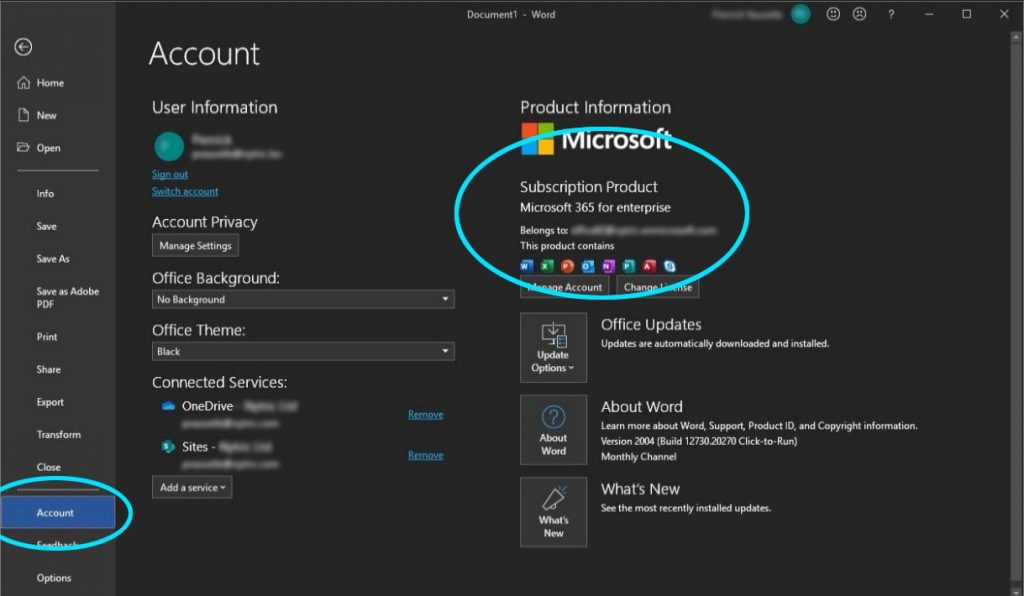
- In Windows, open any Office app (Excel, PowerPoint, Word…)
- Go “Files” -> “account” and verify that the product is activated
- If the account is inactive, contact your IT department to activate the license or purchase a new one.
If you are still having issues, feel free to contact our tech support team and we will be more than happy to get on a call and try and resolve this issue.