
High expectations, complex requirements, and diverse users make boardrooms a design challenge.
- Must be easy to use – High-profile meetings mean users hesitate to physically engage with tech even when it’s there.
- Hard to see presenter – The presenter is just one more small box; they can’t ‘stand up’ or stand out.
- Difficulty with inking – Limited use of whiteboards. No easy way to interact with content.
- Difficult to control multiple displays – Content must be shown to in-room participants and remote attendees at once, with few tools to manage both intuitively.

Ideal Setup and Configuration
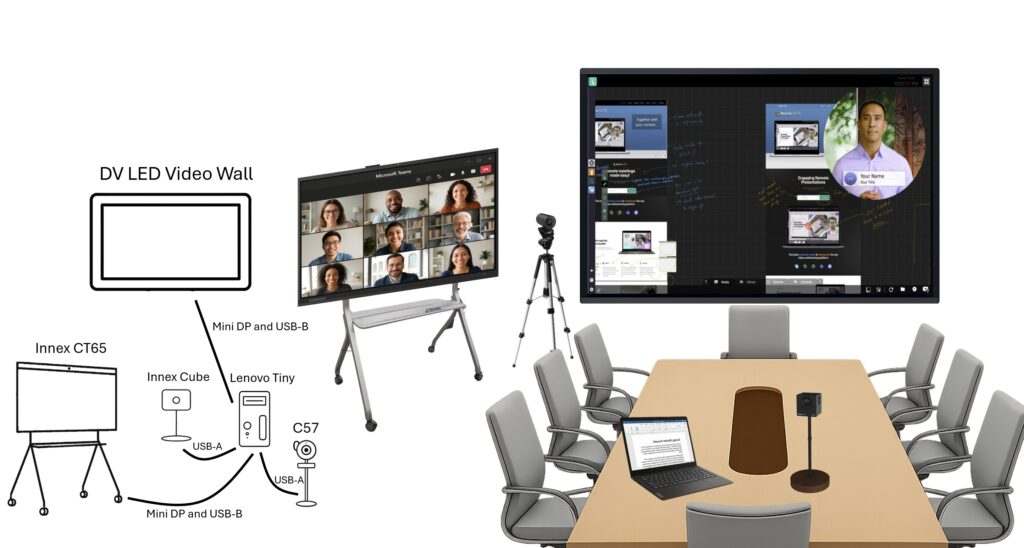
Recommended Board Room Hardware:
– Mini PC with dedicated graphics running Reactiv SUITE
– Innex CT65
– DV LED touchscreen video wall
– Innex Cube
– Innex C570
Required Board Room cables include:
– Mini DP to HDMI & USB-B (x2)
– USB-C to USB-A (x2)
Board Room Tech Advantages
A well tuned board room setup boosts how people talk , how the presentations look, and how fast everyone can coordinate. When teams smooth out the tech handoffs and make the content easier to see, the whole meeting feels more professional and inviting for every participant, even if they are not fully tech minded.