
Training Space environments mainly benefit on-site participants during hybrid learning sessions.
- Limited Display and Interaction Technology– Single Display focus, traditional dry-erase whiteboards, disjointed visual flow.
- Camera Limitations and Visual Disengagement– Remote participants can’t see classmates’ reactions, gestures, or active engagement, diminishing the sense of inclusion.
- Lack of Presentation Tools – proper camera setups for physical gestures or product demos

Ideal Training Space Setup and Configuration
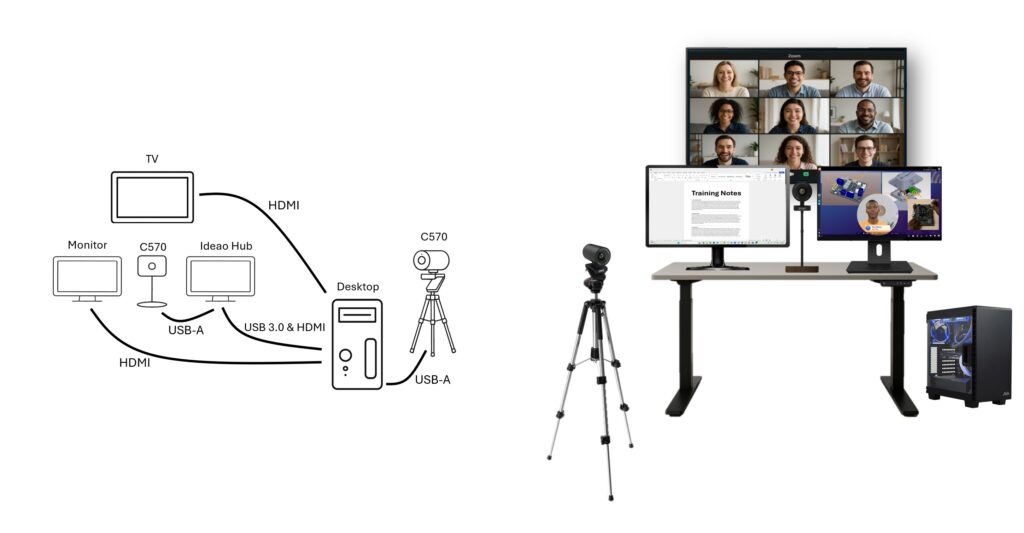
Required hardware:
– Desktop running Reactiv SUITE
– Ideao Hub
– Innex C570 camera (x2)
– Secondary monitor
– TV
Required Cables:
– USB-C or USB-B 3.0 paired with HDMI between the Idea Hub and Desktop
– USB-C to USB-A (x2)
– HDMI (x3)
With the right Training Space setup, organizations can make collaboration work better, boost participant engagement a bit, and create more effective hybrid learning, experiences for instructors and attendees, really.