
Reactiv STAGE allows you to control content on multiple monitors. You can easily ‘throw’ content in a specific direction, and share that content on a specific extended display. This is ideal in any location where a teacher, or a presenter, needs to curate and share specific content to their audience.
Different versions of Reactiv SUITE allow for different number of extended displays to be managed.
- Reactiv SUITE PRO – 1 extended display (throw in any direction)
- Reactiv SUITE IWB – 3 extended displays (throw left, right, up)
- Reactiv SUITE WALL = 5 extended displays (throw left, right, up, diagonal right, diagonal left)
This setup can be configured in Settings -> Device Manager -> Display Layout Menu.
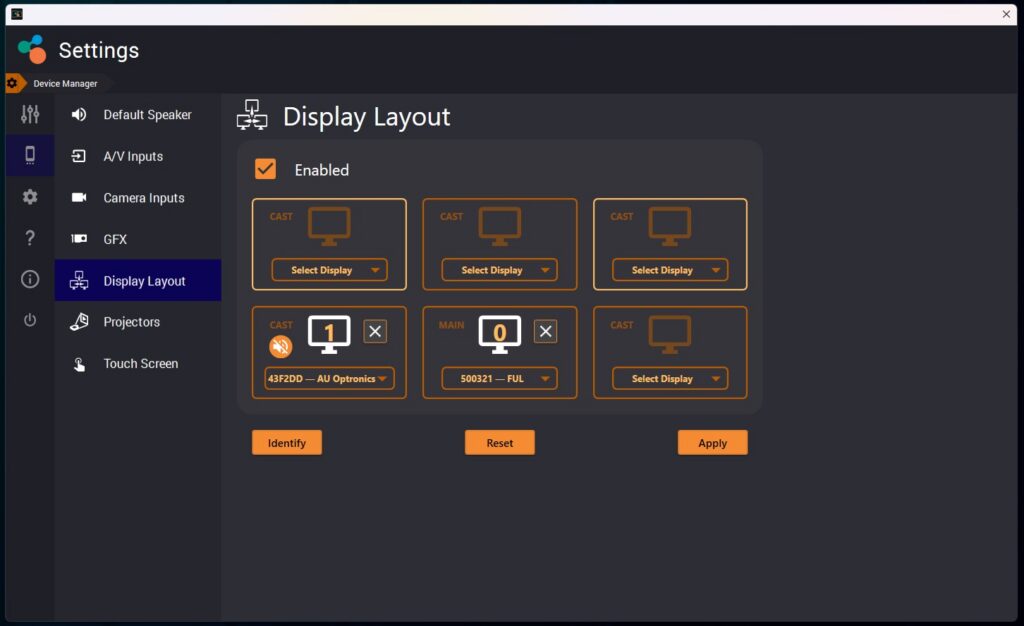
In STAGE you can either choose to share a specific document or content (extend), or you can choose to share the entire canvas (mirror)
- To share just one document, long press on the content to grab it, and throw in the direction of the extended monitor
- To mirror the entire canvas, long press on the background of the canvas, and throw that in the direction of the extended monitor